Learn
Virtual Art Gallery for Classes: No Student Logins
Updated 2026-11-12
A virtual art gallery gives a class something a shared folder can’t: one room where everyone’s work hangs together, which anyone with the link can walk through after the course ends. This page is for university instructors and adult art classes. It covers what a class show needs, how the YinSeal virtual art gallery works, and how it compares with three general-purpose tools, Metasteps (formerly Artsteps), Kunstmatrix and Exhibbit. Their prices and features were checked on their own websites on 12 November 2026.
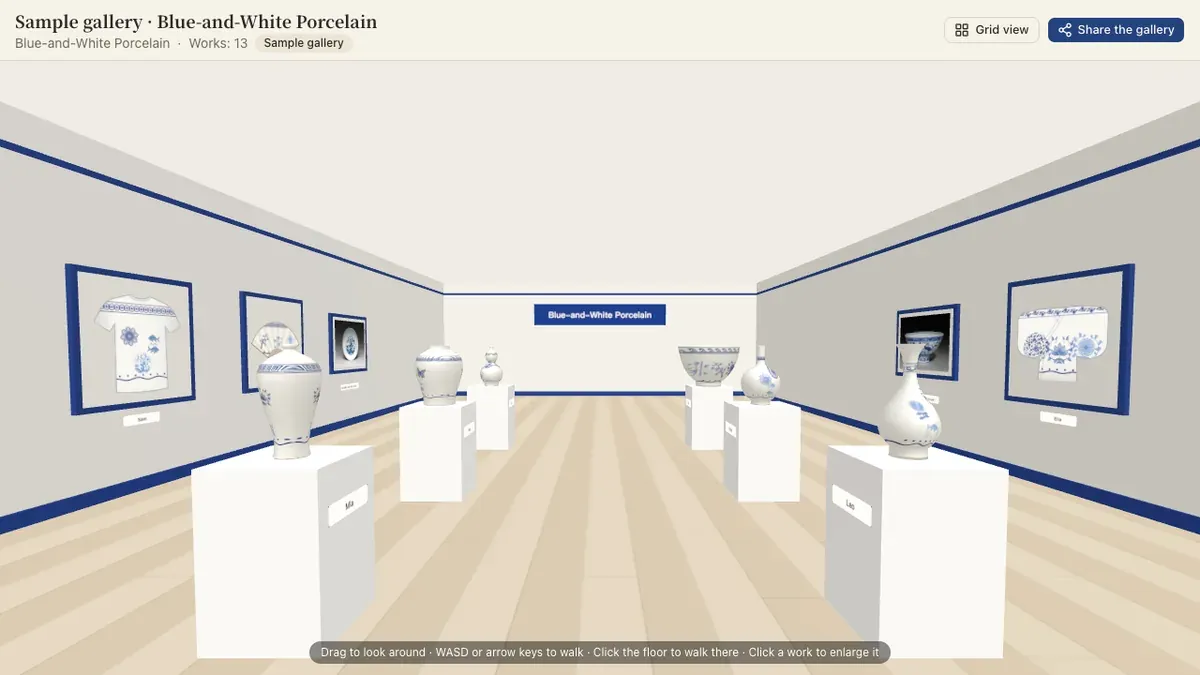
Drag to look around; walk with WASD or the arrow keys, or the on-screen joystick on a phone.
What a class virtual art gallery needs
Most virtual gallery tools are built for one curator hanging finished work. A class is different:
- Many contributors, few accounts. Getting 30 students signed up to another service takes class time and collects personal data you may not need.
- Mixed media. Some students work digitally, others on paper.
- Moderation. You need to feature pieces for critique and hide others without deleting them.
- A link that works everywhere. The room has to open on a lecture-hall display and on a phone, and still show something on devices without 3D.
- Privacy. First names or nicknames, no faces, no location data in photos.
How the YinSeal virtual art gallery works
- Open a class. In My classes, choose one or more themes (blue-and-white porcelain, painted pottery, Han brick rubbings, seal carving) and start the class. You get a student link and a QR code.
- Students make and hand in. Students open the link and type a first name or nickname; there is no sign-up. They create in the studio and choose Hand it in, or photograph a paper artwork and upload it. On a shared classroom screen, Next student clears the canvas for the next person. A class takes up to 80 works.
- Add paper work in bulk. If the class worked on paper, you can upload many photos at once from your class page. Photos are resized and their location data is removed before upload.
- Walk the gallery. Painted vessels stand on plinths down the middle of the hall as slowly turning 3D forms, built from the same profile as the blank the student painted, with the painted side facing front. Flat pieces, rubbings and seal prints hang in frames on the walls. Visitors drag to look around and walk with WASD or the arrow keys, or with an on-screen joystick on phones; clicking a piece opens it with its scene picture. Devices without WebGL get a grid view.
- Run the critique. Your class page refreshes every 10 seconds. Feature a piece for discussion, Hide one to keep it out of the gallery, Delete for good, and Close or Reopen submissions for deadlines and revisions.
Anyone with the gallery link can view it. Class galleries are kept out of search engines, and students appear only under the nickname they typed.

What it doesn’t do
YinSeal is narrower than the tools below. You can’t design the room, upload your own 3D models, video or audio, embed the gallery in another site, or open it in a VR headset. What it does offer is a direct path from making to showing: the studio and the gallery are one tool, so nothing has to be exported, collected and re-uploaded.
Virtual art gallery tools compared
From each vendor’s own pages, checked 12 November 2026. Prices change, so follow the links before you buy. YinSeal is our own product.
| YinSeal | Metasteps (formerly Artsteps) | Kunstmatrix | Exhibbit | |
|---|---|---|---|---|
| Entry price | One lesson, an annual pass, or a one-off photo 3D show (see Pricing below) | Creator €14/month, 1 published space[1] | Basic €10/month ex-tax, 50 artworks, 5 public exhibitions[4] | Solo space $10/month billed yearly or $15 monthly, up to 20 artworks[10] |
| Free option | Sample works and galleries; studios open in preview, with a watermark | 14-day trial, no card[1] | Starter: 10 artworks, no public exhibitions[5] | 7-day trial, 5 artworks, no card[11] |
| Education | Built around classes | Discounts on annual plans; Business plan "works as a classroom plan"; academic plans on request[2][3] | KUNSTMATRIX.EDU (beta): class package €30/month incl. tax, 40 seats[8] | Group Management add-on, $35/month, one gallery per assigned user[12] |
| How students add work | Class link and nickname, no account | Under the instructor’s Business account[3] | Invited by email as Contributors[9] | Each assignee gets an email link to join[12] |
| 3D objects | Painted vessels shown in 3D; no model upload | OBJ and glTF/GLB upload, from Creator Pro (€29/month)[1][2] | One glb or gltf file per sculpture[6] | None found on the site |
| VR headsets | No | Metasteps VR app[2] | None found on the site | None found on the site |
| Room | One themed hall | Templates, premade and uploaded spaces[2] | Ready-made rooms; custom rooms as a paid service[7] | Choice of gallery spaces, priced per space[10] |
Artsteps itself now tells creators that editing has moved to Metasteps, which it calls "our newly created platform"[13].
Which one fits your class
- Students make the work and show it in the same session, especially in a Chinese art, design-history or pattern unit: YinSeal.
- You are curating finished work with your own layout, video or sound: Metasteps, Kunstmatrix or Exhibbit. Metasteps adds 3D model upload and a VR app; Kunstmatrix has an education edition priced by seats; Exhibbit prices each gallery space separately, which keeps a single show simple.
- Students already work in 3D software: Metasteps or Kunstmatrix, both of which take glTF files.
For a longer comparison that also covers ArtPlacer, Spatial and OpenVGal, see Artsteps alternatives. For ready-made class projects to fill the gallery, see the Ming vase art lesson and the Lunar New Year 2027 lesson.
Pricing
You can walk through a finished class show before you decide.
Photo 3D show
$15
$6 if you buy in your first hour
- One 3D gallery of photographed paper work
- Up to 80 works
- The link stays live for 12 months
One lesson
$12
$4.80 if you buy in your first hour
- Lesson plan, slides and student brief for this lesson
- Run it with as many classes as you like, each with a 3D gallery
- Yours to keep, with no expiry
Annual pass
$59/year
$23.60 if you buy in your first hour
- Every lesson, including new ones as they come out
- Every work taken home without the watermark
- Unlimited photo 3D shows
No trial of the lesson pack: the sample works and sample galleries are free to look at, and the studio itself can be tried in preview, with a watermark. See pricing
Class virtual art galleries: common questions
- Do students need accounts to add work to the virtual art gallery?
- No. They open the class link and type a first name or nickname. Only the instructor signs in.
- Can I show work made on paper?
- Yes. Students can upload a photo from the class link, or you can add many photos at once from your class page. Location data is removed before upload.
- How many works fit in one gallery?
- Up to 80 per class.
- Who can see the gallery?
- Anyone you give the link to. Class galleries are kept out of search engines, and you can hide any piece at any time.
A virtual art gallery works best as the last step of making, not as a separate upload job. Walk through a sample class show and see whether that fits your course.
Sources
- Metasteps, Pricing (read 2026-11-12)
- Metasteps, FAQs (read 2026-11-12)
- Metasteps, Education (read 2026-11-12)
- Kunstmatrix, Pricing (read 2026-11-12)
- Kunstmatrix, FAQ: pricing details for the 3D online gallery (read 2026-11-12)
- Kunstmatrix, FAQ: how to create sculptures and 3D objects (read 2026-11-12)
- Kunstmatrix, FAQ: can we upload our own floor plans (read 2026-11-12)
- KUNSTMATRIX.EDU, Pricing (read 2026-11-12)
- KUNSTMATRIX.EDU, FAQ: user roles and their permissions (read 2026-11-12)
- Exhibbit, Pricing (read 2026-11-12)
- Exhibbit, free trial page (read 2026-11-12)
- Exhibbit, Tutorials (read 2026-11-12)
- Artsteps web app (text read from the site’s JavaScript bundle) (read 2026-11-12)